The web was built for everyone. For decades, it just wasn’t designed that way. Something is shifting, and the shift is worth understanding clearly.
1.3B People live with a significant disability globally. That’s 1 in 6 of us. That’s not a niche audience, not an edge case. A substantial portion of every user base, every product, every digital experience ever designed.
Stuti Mazumdar - May 2026
Around 430 million people globally experience disabling hearing loss and depend on captions and visual cues. Millions navigate the internet entirely through screen readers, voice commands, or keyboard-only interactions.
For these users, an inaccessible digital product isn’t a friction point. It’s a closed door.
Americans with disabilities alone hold approximately $490 billion in disposable income.
The business case has always been there. The human case has always been there. What has been missing is the urgency to act on both.
What is digital accessibility?
The practice of designing and building websites, apps, and digital content so that everyone, especially people with disabilities, can use them. It covers visual, auditory, motor, and cognitive needs, and is guided internationally by the Web Content Accessibility Guidelines (WCAG).
What Accessibility Looked Like Without AI
Honest answer? It looked like a checklist at the end of a project.
Manual WCAG audits. Developer-dependent fixes. Alt text written, or forgotten, by the content team. Accessibility treated as a compliance concern rather than a design consideration. Something to be addressed after the real work was done.
The average homepage carries around 51 accessibility errors. Most of them aren’t exotic edge cases, they’re the basics. Missing labels. Poor contrast. Images with no description. Problems that have been solvable for years, just routinely deprioritized.
As recently as 2025, 94.8% of websites still failed basic WCAG accessibility standards. After decades of guidelines, advocacy, and awareness, the needle has barely moved.
The barriers were always the same three: too complex, too costly, too slow. For decades, those excuses held. AI is dismantling all three.
What AI Is Actually Doing Now
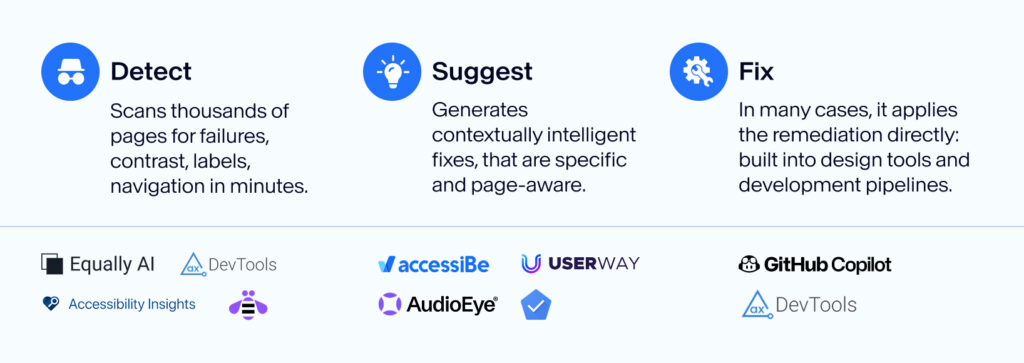
AI hasn’t solved accessibility. What it has done is embed the process of getting there into the workflow itself, so it no longer feels like an extra step bolted onto the end of a project. Here’s where the change is real.
1. Detect
Catching what was always missed
AI tools now scan thousands of pages for accessibility failures: poor color contrast, missing labels, broken navigation structures, in minutes. Tools like Deque’s axe DevTools, Microsoft Accessibility Insights, and IBM Equal Access Checker make this possible today, running directly inside development pipelines so issues are flagged before anything goes live.
What previously required weeks of manual auditing now happens at the source, every time. The errors that were routinely deprioritized because there was no time to find them? AI finds them automatically.
2. Suggest
From detection to direction
Finding the problem is only half the work. AI now generates contextually intelligent recommendations for how to resolve it, and this is where the change runs deepest. Early tools returned a list of violations. Modern AI suggests specific, actionable fixes: generating alt text that reflects not just what an image shows but why it matters on that specific page, recommending precise contrast ratios, proposing correct ARIA labels, and flagging the right semantic HTML for the right context. The suggestion isn’t generic. It understands the page it’s reading.
Tools like MIT’s VisText, Google’s Accessibility Scanner, and AudioEye’s AI engine enable exactly this today, moving teams from a list of what’s broken to a clear path for fixing it.
3. Fix
Remediation built into creation
In many cases, AI doesn’t stop at the suggestion. It applies the fix. Design platforms like Figma now embed automated contrast correction, semantic structure guidance, and real-time annotations directly into the design workflow, so accessibility decisions happen during creation, not after it.
GitHub Copilot, Stark, and Adobe’s accessibility tools follow the same principle, surfacing issues and applying corrections as you build, not after you ship. The shift-left principle, catching issues when they are cheapest to fix, is finally a practical reality, not just a best practice on a checklist.
10× Reduction in time to assess and correct accessibility issues with AI-assisted tools
20→12% Speech recognition error rate drops after training on more diverse voice data, a real shift for millions who navigate by voice alone
What AI Still Can't Do
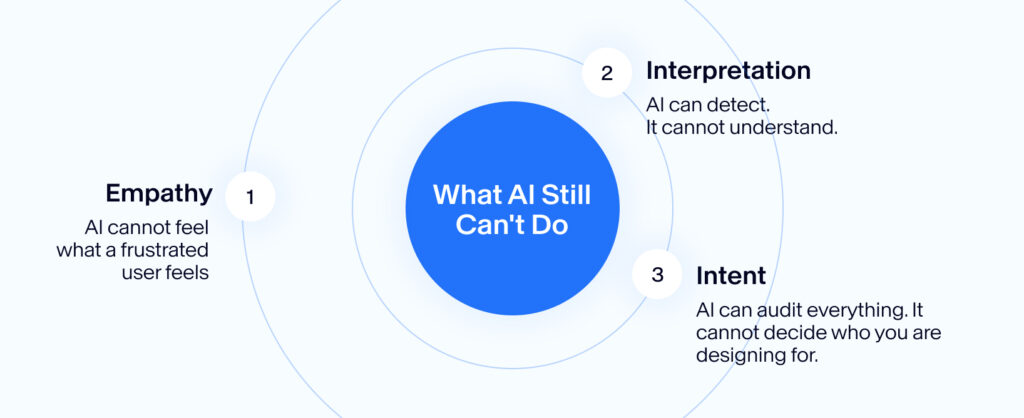
The tools are better than they’ve ever been. They are not a replacement for what they were never designed to do.
1. Empathy
AI cannot feel what a frustrated user feels
It can flag a contrast failure. It cannot tell you what it is like to navigate a poorly structured page under cognitive fatigue, the compounding frustration of a screen reader announcing raw filenames, of a form that traps keyboard focus, of a product that treats your way of moving through the world as an edge case. That experience is not in any dataset.
2. Interpretation
AI can detect. It cannot understand.
It can determine whether an image has alt text. It cannot determine whether that alt text is meaningful to the person reading it. It can confirm a button has a label. It cannot tell you whether that label makes sense to someone with a cognitive disability navigating your product for the first time. The difference between technically present and genuinely useful is still a human call.
3. Intent & Design Judgment
AI can audit everything. It cannot decide who you are designing for.
No tool can substitute the decision to center accessibility from the start, to include users with disabilities in research, to test with screen reader users, to question whether a design pattern that works for most actually works for all. That judgment lives upstream of any audit. It is set before a single tool is opened. AI can sharpen your execution. It cannot set your intention.
Automation without intention is still negligence. Just faster.
4. Our Stance
There is No Excuse Anymore
AI has lowered the barrier to accessible design more than anything in the last two decades. The audit is faster. The suggestions are smarter. The fixes, in many cases, are automatic. A hybrid approach, AI detection and suggestion, paired with expert judgment and real user testing, now delivers the highest standard of accessibility at a cost and speed that is within reach for teams of every size.
That changes the nature of the conversation entirely.
For twenty years, the barriers were real. Complex to implement. Expensive to audit. Too slow to fit the sprint. Those constraints shaped how the industry treated accessibility, as something to address later, if at all. AI has systematically removed each one of them.
What remains is not a technical problem. It is a priorities problem.
There is no credible argument left for shipping a product that ignores contrast, omits labels, breaks keyboard navigation, or leaves images undescribed. These are not hard problems anymore. They are choices. And in 2026, choosing to ignore them is not a resource decision, it is a values decision.
At minimum, the basics. Contrast. Labels. Alt text. Keyboard navigation. If your product fails on these, it is not because the tools weren’t available. It is because the intention wasn’t there.
Accessibility was never a technical constraint.
It was always a question of who you're willing to design for and whether you're willing to be honest about the answer.
We have been practicing user-centered design for over 20 years. Accessibility isn’t a feature we add to our work, it’s a lens we bring to it from the start.
Sources
- World Health Organization
- WebAIM Million Report, 2025
- AudioEye Accessibility Research
- EDUCAUSE Review, 2024
- accessiBe, 2023
- Be Accessible, 2025
- Wearetenet, 2025