As UX professionals, our primary goal is to create experiences that are accessible, seamless, intuitive, and enjoyable for users worldwide. However, a critical aspect that often gets overlooked is cognitive load. It refers to the mental effort required for users to process information and interact with an interface or an experience. Understanding and managing cognitive load in digital design is essential for optimizing user experiences and ensuring they can easily understand and interact with products.
Stuti Mazumdar - October 2024

Understanding Cognitive Load and Its Types
In the context of product design, cognitive load can be thought of as the users’ mental process when engaging with a design. Cognitive load is influenced by several factors, including the amount of information displayed, the complexity of the task at hand, and how clearly the information is presented on the screen. Cognitive load theory suggests that there are three types of cognitive load, each affecting user experiences in different ways:
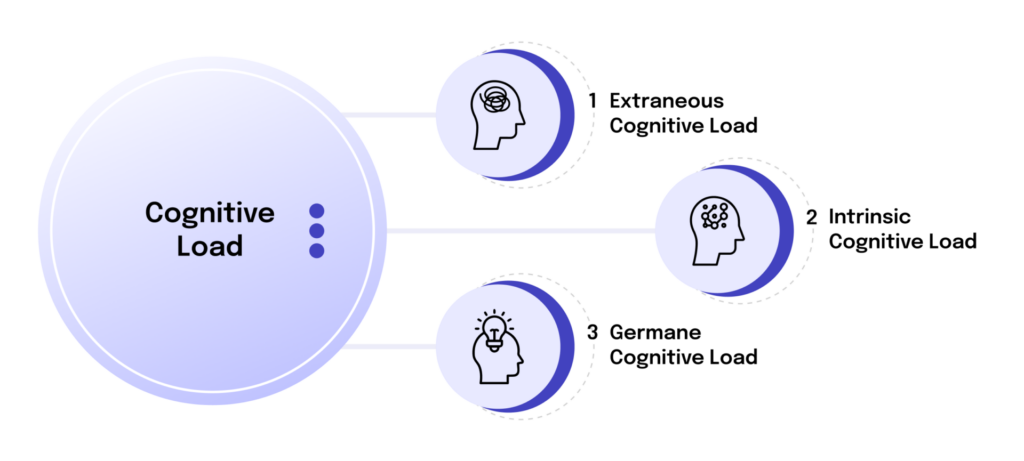
1. Extraneous Cognitive Load
This type is generated by unnecessary elements in the design that do not contribute to enhancing the user experience in any capacity. Extraneous cognitive load is often a result of “quick fixes” or poor design decisions, such as disorderly layouts or an extensive amount of information cluttering the screen simultaneously, which can overwhelm users and inhibit their ability to process information seamlessly.
2. Intrinsic Cognitive Load
This kind of cognitive load directly correlates to the number of resources contributing to the complexity of the task. Ergo, with more variables in action, your experience will get exponentially more complex for any user. Intrinsic cognitive load is based on the principle of the working memory of an average user. For example, understanding a complex infographic requires more mental processing power than reading a simple headline-paragraph-based webpage.
3. Germane Cognitive Load
Unlike the other types of cognitive load, germane cognitive load is much needed when designing an experience. It signifies the amount of effort a user is willing to take to understand the interface crafted for them. They do so by analyzing the experience and translating it into an organized, structured schema of information that makes sense to them. It is, at its core, personalization.
A good example is Duolingo’s onboarding. It introduces concepts one at a time, builds on what the user already knows, and gradually increases complexity. Users aren’t just learning a language; they’re building a cognitive schema for how the product works, almost without realising it.
Fundamentals of Reducing Cognitive Load in Digital Design
The concept of cognitive load theory equips designers and other UX professionals with a valuable framework. By understanding how cognitive load impacts user interactions, a UX designer can make informed decisions that reduce cognitive load and unnecessary mental effort required by users, creating more user-friendly and accessible experiences.
To get started, one can simply work on the two fundamental reasons why users feel overwhelmed with certain experiences.
1. Simplify the content design across the experience
Since intrinsic cognitive load is closely tied to the effort it takes for a user to understand what’s happening on the product, the quickest way to make the experience seamless is to scale down the amount of information on the screen and make it accessible for your target audience. It may include removing jargon, implementing or simplifying instructional design across the experience, and using best practices when crafting UX copy. Writers and designers should prioritize essential content, making sure that users are only presented with the information they need at each stage of their interaction.
2. Eliminate clutter on the screen
Strategies to Manage Cognitive Load in Digital Design
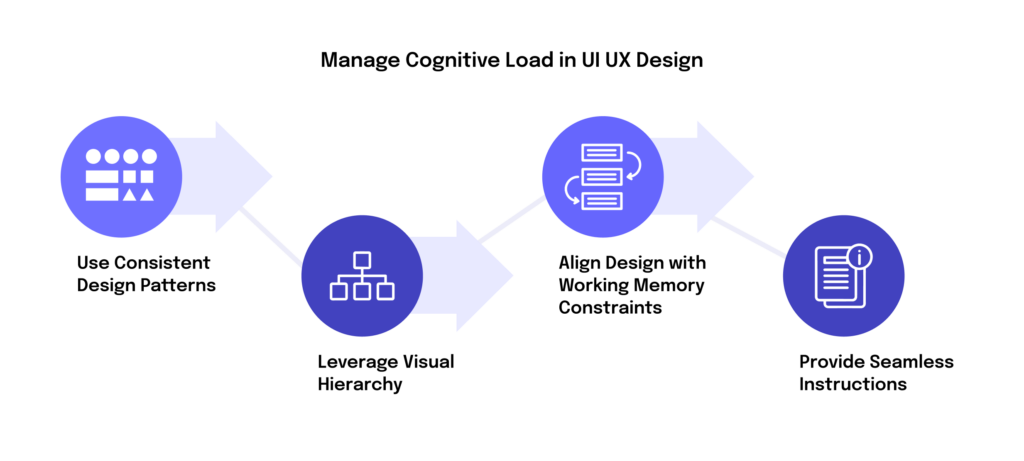
Now that we know the two fundamentals of reducing cognitive load, let’s discuss a framework to manage it in any digital product:
1. Use Consistent Design Patterns
When users recognize familiar design experiences, they don’t need to expend additional mental resources familiarizing themselves with new design patterns—that is, no learning curve to climb over. Consistent design helps users predict what will happen next and navigate with ease. This builds trust and stickiness across your digital product. For example, placing navigation bars in expected locations or using common icons can make designs more intuitive and feel natural to users.
2. Leverage Visual Hierarchy
The way information is structured and presented can significantly influence how users process or focus on it. By employing a clear visual hierarchy, you can direct users’ attention to the most critical elements first, reducing cognitive load significantly. Additionally, use design principles like contrast and spacing to prioritize information, reducing the amount of mental effort required for users to get accustomed to the layout of the interface.
3. Align Design Strategy with Working Memory Constraints
We are all well aware of the limitations of the working memory of any average individual. Users can only hold a small amount of information at a time, especially in the era of micro-content. Respecting this limitation, designers should avoid overloading users with too many details on an interface or options when trying to complete an action. Moreover, content should be presented throughout an experience in digestible chunks as it helps prevent cognitive overload, making mental processing easier for all cohorts of users.
4. Use Progressive Disclosure
Not all information needs to be visible at once. Progressive disclosure is the practice of revealing only what a user needs at each stage of their journey, keeping interfaces clean and reducing extraneous cognitive load significantly. Rather than presenting every feature, option, or detail upfront, designers surface complexity only when the user is ready for it, and only when it’s relevant. This is especially effective in form design, onboarding flows, and settings pages where the full amount of information can otherwise feel paralyzing.
5. Provide Seamless Instructions
One of the goals of good product design should be to support germane cognitive load by reinforcing learning and understanding. Progressive disclosure, thus, applies to instructional design too. Providing clear, step-by-step instructions at all times and offering helpful feedback across all user journeys can enhance the learning experience without making users feel overwhelmed. Techniques like chunking, where information is broken into smaller units, or dual coding, where both text and images are used, can improve comprehension and retention. Applying these principles in instructional design ensures that the content is presented in a way that reduces extraneous cognitive load, making it easier for users to process information effectively.
How AI Is Changing the Way We Manage Cognitive Load
The strategies above remain foundational, but AI-powered interfaces are introducing a new layer of complexity to how cognitive load refers to the design challenge. On one hand, AI presents a genuine opportunity: adaptive, closed-loop interfaces can now observe user behavior in real time and automatically adjust the granularity, ordering, and modality of information to match a user’s cognitive state at any given moment. A study published in 2026 found that AI-adaptive interfaces reduced decision time and perceived workload significantly compared to static interfaces, particularly under high information density. For a UX designer, this is a powerful tool: the mental effort required no longer needs to be a fixed design assumption.
On the other hand, AI-powered tools introduce their own form of extraneous cognitive load. Interfaces that surface too many suggestions, automate too many decisions, or offer too much personalisation simultaneously can cause users to feel overwhelmed in entirely new ways. Research from the University of Technology Sydney flags a related concern: over-reliance on AI, especially of young minds, for cognitive tasks risks what they call “cognitive offloading,” where working memory and critical thinking capacity weakens over time from underuse.
The implication for digital design is clear here. AI should reduce the mental resources spent on friction, not replace the thinking that builds understanding. The goal remains to make the experience feel natural, AI is just a more dynamic tool to get there.
“AI that reduces the right cognitive load is a gift. AI that removes the need to think entirely is a risk. The distinction is everything.” —Deepali Saini | CEO at Think Design Collaborative
Cognitive Load in the Age of Agentic AI and Multimodal Design
As agentic AI and multimodal interfaces become mainstream, cognitive load theory is being stress-tested in ways its original framework didn’t anticipate. Multimodal interfaces, combining text, voice, gesture, and visual input, may continue to introduce intrinsic cognitive load from context-switching between modalities. A user toggling between typing a prompt, reviewing a visual output, and issuing a voice correction is managing three parallel cognitive streams simultaneously. The amount of mental effort required compounds quickly. For designers working on these systems, a few emerging principles apply:
- Default to one modality at a time. Let users opt into complexity, don’t front-load it. Progressive disclosure applies to modality, not just content.
- Make agent actions visible, step by step. When an AI agent acts on a user’s behalf, each action should be legible and interruptible. Invisible automation increases cognitive anxiety, not confidence.
- Design for cognitive recovery. Build in “calm states” — moments of low stimulus where users can reorient, especially after complex multi-step flows. This is what Calm UX is built on.
The challenge for any product designer in this era isn’t just reducing cognitive load, it’s knowing which kind to reduce. Stripping away extraneous cognitive load is always right. But preserving the mental effort required for genuine understanding? That’s still where great design earns its keep.